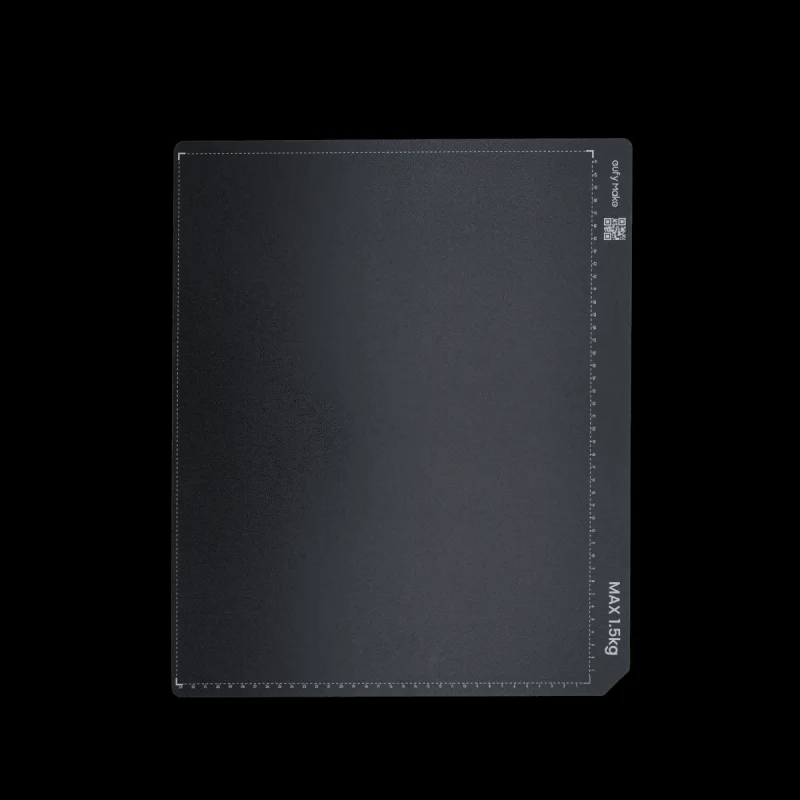
Your eufyMake E1 is very good at putting ink exactly where you tell it to.Unfortunately, it assumes the object will remain where you put it.The eufyMake E1 Standard Adhesive Holding Mats provide a clean, lightly adhesive work surface that helps keep flat m
Your eufyMake E1 is very good at putting ink exactly where you tell it to.
Unfortunately, it assumes the object will remain where you put it.
The eufyMake E1 Standard Adhesive Holding Mats provide a clean, lightly adhesive work surface that helps keep flat materials and small objects securely positioned on the E1 Standard Flatbed during printing. Each mat includes the E1 alignment grid, making it easier to place your project accurately, preview its location, and avoid discovering halfway through a print that your coaster has quietly wandered three millimeters to the left.
This is the larger Standard-size mat for the full-size E1 flatbednot the smaller Mini Flatbed version.
UV printing depends on accurate placement and consistent distance between the printhead and the object being printed. Even a small amount of movement can result in misplaced artwork, blurred edges, registration errors, or a beautifully detailed design printed partly onto the surrounding mat.
The adhesive surface helps hold compatible materials in place while the E1 moves through its printing process. It is especially useful for lightweight, thin, or smooth items that might otherwise shift during setup or printing.
Good candidates include:
Cardstock and paper products
Invitations and greeting cards
Thin plastic sheets
Acrylic blanks
Labels and signage materials
Flat wood pieces
Leather and faux-leather patches
Metal cards and plates
Coasters and small promotional products
Product packaging
Craft blanks
Jigs and positioning templates
Other flat or lightweight printable objects
Material compatibility and adhesion can vary, so always test delicate, porous, coated, or easily damaged surfaces before placing an entire production batch onto a fresh mat.
Each mat measures approximately 330 420mm, matching the working area of the eufyMake E1 Standard Flatbed.
The integrated grid helps with:
Consistent object placement
Visual alignment
Repeatable batch setups
Positioning multiple items
Creating reusable jigs
Confirming the approximate print area
Reducing the ancient craft tradition known as eyeballing it
For repeat jobs, the grid can help you place each blank in the same location from one print to the next. Pair it with a reusable jig and you can create a much more efficient production workflow for cards, tags, coasters, signs, promotional items, and other repeated products.
Adhesive holding mats are consumable items.
Over time, dust, fibers, overspray, fingerprints, debris, and repeated object removal will reduce the mats holding strength. Eventually, the surface may stop gripping reliably or become too marked up for accurate visual alignment.
A 10-pack keeps replacements ready for:
Production jobs
Different material types
Clean projects that need a fresh surface
Dedicated jigs or product layouts
Accidental ink overspray
Accidental direct printing onto the mat
That one project where everything went perfectly except for absolutely everything
Keeping spare mats on hand means you can replace a damaged or contaminated mat immediately instead of trying to convince yourself that the corner lifting up is probably fine.
It is rarely fine.
For businesses and high-volume makers, separate mats can be assigned to specific products or workflows.
For example, you might keep one mat for:
Business cards
Coasters
Acrylic signs
Packaging prototypes
Product labels
Leather patches
Frequently used positioning jigs
This reduces setup time and helps maintain consistent placement between jobs. Multiple mats can also be prepared in advance, allowing operators to unload one completed project while setting up the next.
The E1 may be compact, but there is no rule saying your workflow has to be.
Remove the used adhesive mat from the Standard Flatbed.
Clean the flatbed surface and remove any remaining residue or debris.
Align the replacement mat carefully with the tray.
Apply it gradually, smoothing from one edge toward the other.
Press the mat firmly into place and remove any trapped air pockets.
Confirm that the mat lies completely flat before printing.
Take your time during installation. A wrinkle or raised edge can interfere with object placement and may affect printhead clearance.
Handle the adhesive surface with clean hands.
Keep the mat covered when it is not in use.
Remove dust and loose debris before placing projects.
Avoid touching the adhesive area unnecessarily.
Lift objects carefully instead of dragging them across the surface.
Use masking material or sacrificial transfer film when intentionally printing alignment outlines or working near object edges.
Replace the mat if it becomes wrinkled, damaged, heavily contaminated, or unable to hold objects securely.
Confirm object height and printhead clearance before every print.
These mats are designed to hold projects in place. They are not intended to permanently bond objects, defeat gravity indefinitely, or correct an object that was positioned using pure optimism.
eufyMake E1 Standard Flatbed
These mats are sized for the larger Standard Flatbed and are not intended as replacements for the smaller eufyMake E1 Mini Adhesive Mats.
Please confirm which flatbed you are using before ordering. The Standard version is the big one. We have now used several sentences to make that point because someone, somewhere, will still order the wrong size.
Genuine eufyMake replacement accessory
Designed for the eufyMake E1 Standard Flatbed
Approximately 330 420mm
Adhesive surface helps secure objects during printing
Printed grid supports positioning and alignment
Useful for individual projects and repeat production
Helps reduce shifting and registration errors
Easy peel-and-apply replacement
Suitable for a wide range of flat printable materials
Includes 10 Standard-size adhesive mats
10 eufyMake E1 Standard Adhesive Holding Mats
Flatbed, printer, printed objects, and the confidence to run an unattended 14-hour production job are not included.

Reviews
There are no reviews yet.